Introducing Paystack Automated Chargebacks
We’re excited to introduce a new and improved chargebacks process for Paystack merchants, launching on January 29th

Say hello to better chargeback management
A chargeback claim is a refund request that your customer makes at their bank when they believe that they haven’t received value for their money.
Merchants are required by the bank to respond to chargeback communications within 24 hours. If the merchant fails to respond in time, the claim is automatically approved, and the merchant is debited. (Note: this is the standard chargeback process for all payment gateways)
Before now, such claims were mostly hashed out via email and phone calls, which could be slow and inefficient.
From January 29th, when one of your customers goes to their bank to log a dispute against you, the claim will automatically show up on your Paystack Dashboard, and you’ll be able to accept or dispute the chargeback, right from your Dashboard!
How chargebacks are handled now
When a chargeback is issued against a Paystack merchant, the entire process of resolution (including sending proof of purchase) happens via numerous emails amongst multiple parties.
Merchants are unable to see a neat overview of all pending chargeback claims, and there’re rare occasions where duplicate chargeback claims are logged against the same transaction (the multiple email chains make it difficult to realize when this has happened).
It’s a cumbersome, inefficient process for all involved.
A look at the new chargeback system
The new system was designed to allow Paystack merchants have better control and visibility into chargeback claims made against you by your customers.
It starts with a brand new platform through which the bank logs the claim. This centralized platform makes it impossible for duplicate chargebacks to be claimed against the same transaction.
Once a claim is logged, Paystack immediately triggers a chargeback alert email to you to request your review. You’ll be able to log into the Paystack Dashboard to either accept the claim, or dispute it with evidence.
Remember how banks require merchants to respond within 24 hours, else the claim is automatically applied and you’re debited? If you’re nearing the deadline without responding, you’ll receive 2 helpful reminders to respond to the claim before the deadline.
Right from the email, you’ll be able to click on a link that takes you directly to the Paystack Dashboard.
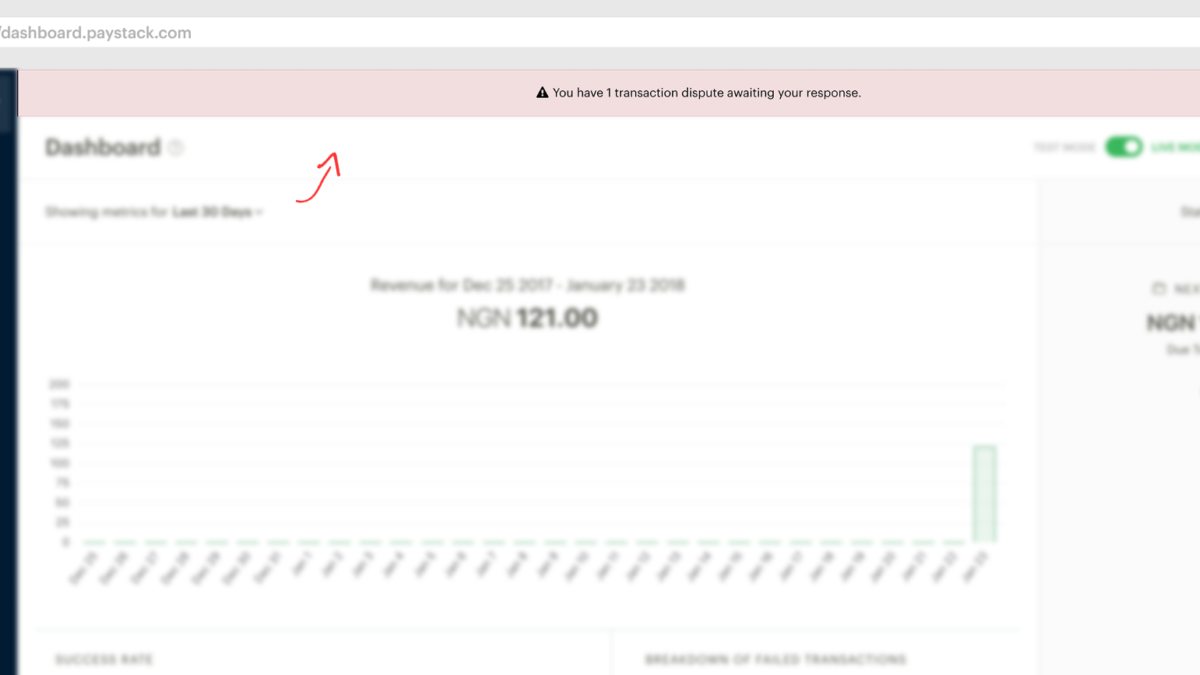
You’ll see a conspicuous banner at the top of your dashboard that’s designed to alert you of pending transaction disputes. Simply click on the banner to start resolving the transaction disputes.

On the page of the disputed transaction, you’ll be able to accept a claim, or reject it by uploading proof of delivery of service, such as a receipt of the transaction. The bank reviews the evidence you’ve submitted, and they can then take action based on the nature of your response.

That’s it! You’ll now be able to manage all your pending chargeback claims right from your Dashboard, which makes it easier to protect your business from undue losses.
🚨 Important: Update your Chargeback Email address today
The new chargeback system goes live on the 29th of January. Paystack sends chargeback notifications to the Chargeback Email Address we have on file for your business. Please login to Paystack to update your Chargeback Email address as soon as possible.
These are very important alerts, so ensure that the email is monitored by a decision-maker at your organisation who is empowered to either accept or dispute the chargeback.


FAQ
When does the new Paystack Automated Chargeback system go live?
The new chargeback process will go live on January 29th, 2018. Starting from the the 29th, you’ll receive automated alerts when chargebacks claims are logged against your business. The email alerts will go to the Chargeback Email Address associated with your business on Paystack (this is why you should update your Chargeback Email address as soon as possible).
What happens if I don’t respond to the chargeback in 24 hours?
If after 24 hours, you don’t respond to chargeback queries, the banks assume that you didn’t offer value to the customer, your account is debited, and the customer is refunded. (Note: the regulations guiding chargebacks are in place to protect the customer, hence the lean-in that favours them)
Can I upload documents that show proof of service delivery?
Yes, you can. You can upload receipts, screenshots of transactions, and other documents that support your own claims.
More info?
If you need any more information at all, please reach out to our friendly Customer Success Experts — they’re happy to help! Kindly send us an email at [email protected]!